Posts

Showing posts with the label Research

Minor Project: Texture Plan For Samurai

Image
Today I decided to map out all of the textures I will be using on the Samurai character. This was important as the drawings are not detail enough to offer an insight as to what they man be. I used  Substance 3D Community Assets  in order to find textures which I will use for the base material in Substance Painter. I will then add my own variations to the textures, such as ware and dirt, based on how I feel the material would be treated if it was real.  Below is a clearer view of the individual materials, as well as a link to all of the original downloads and credit to creator.  Adobe Substance 3D Community Assets   Damast Muster Stone Metal Rainbow - F Krzon Metal Old Silver - Rokviz Studio Practice 02 Snowy CliffRock Face - Stephen Mulligan Wood Stylized Clean - BlenderGames 3D Aluminium Bumped - Fabrice Piquet Silk Generic - Baptiste Manteau worn used scratched blade metal - Caio Trindade Carbon Fibre (карбон) - Румен Пенев Technical Mesh - Malte Resenberg...
Minor Project: Improvements Needed For Characters Designs + Investigating 3D Samurai Models

Image
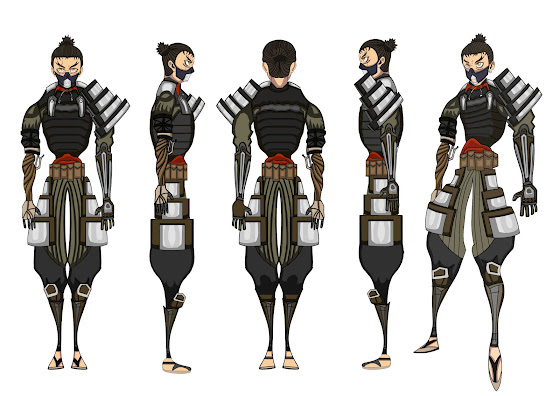
 After showing off the 3D models of my characters to both my Tutors they explained that.. I need to firstly find out whether the armour I'm modelling is accurate both in the direction the armour panels are facing and the way the armour fits the character. It is essential to understanding how everything comes together in 3D if you understand how the armour works in real life.  There are also things such as what will need to be modelled and what I can get away with just texturing in substance painter, which I did not consider. I firstly need to identify the materials I will be using to then understand what needs to be modelled and what can be left up to the texturing faze. As well as this my Samurai character has exposed shoes so you can see his toes. I was advised that If I want to make my life easier when it comes to animation, I should just give him boots which cover his feet. Therefore there is less to consider when animating. This is the sort of thing I never considered whe...

Minor Project: Investigating Environment + Revised Layout Of Map

Image
 Now that I have completed the revised animatic, I now want to begin creating the environment in 3D. However I want to go about doing this in a different way compared to last year, when I modelled the environment for the pre-viz. For the pre-viz I ended up modelling the entire environment as one big model, which allowed me to visualize the animation from my drawings, however made it hard to get certain shots to work. It also made the modelling process more confusing for me as I had to make the environment suitable for the story but also match the drawings (which didn't fit perfectly together).  Instead of doing the same thing for the revised environment, I decided to take a step back and firstly understand how the environment is used within the animation. I did this by collecting every shot where the environment is present within the animatic.  Now that I had gathered each shot and placed them side by side, I could then piece together my environment a lot more clearly in ...

Minor Project: Fight Scene Research + References

Image
 Before starting the animatic storyboard, I watched loads of fight scenes now focusing on choreorgrapby and composition. I did this because of what I previously learnt in the fight scene tutorial;  Montald says that they watch a lot of action sequences and just take notes for what they want to happen in their own work. Then decide which shots you want to take from that. Start with the part which inspires you the most as it will motivate you to continue if that part looks good. I focused on anime fight scenes as I want there to be elements of this in my animation.  Swordplay 剣術 Sakuga MAD Saitama vs Genos Fight | One Punch Man (60FPS) Shimazaki Fight - Mob Psycho Top 10 Best Anime Sword Fight Scenes (EPIC) Mob vs Koyama Full Fight (60fps) One Piece - Zoro vs Mihawk (remastered) As the animation did not just contain fighting but also a running sequence, I also looked into running animations. I found two really useful videos which showed how different animation studios depic...

Minor Project: Investigating Samurai Environment + Colour Pallet

Image
 The events of the animation will take place high up in the mountains, on the trail which leads to the Japanese castle. In order to begin understanding how to visually represent the surrounding mountains, I began doing research on 3D models of mountains. That is when I found the images below from the game Overwatch. I really like the stylized look of the mountains which surround the player on the map named Nepal. I wanted to look further into how this was achieved so that I could recreate the placement of the mountains in my environment. It is done in a way where they completely surround you in the environment, while also not looking overly complicated to model and texture. This is important as my main focus is character and animation, not environment, however I still want my environment to look good.  Below are the screenshots I took from in-game, using the floating camera in spectate mode. This allowed me to get a better look of how the mountains are arranged. I could see th...

Minor Project: Introduction To Substance Painter (Gnomon Tutorial)

Image
 Main Hotkeys Alt + Middle Mouse Click = Pan Camera  Alt + Right Mouse Click = Zoom Camera Alt + Left Mouse = Rotate Camera Alt + Shift + Left Mouse = Rotate In Increments Tab = Swap Interface (Closer Up View Of Object) F1 = Split View (2D + 3D View) F2 = 3D View F3 = 2D View F4 = Swap 3D + 2D Side Shift + Right Mouse Click = Change The Direction Of Light B = Bake (Allows You To See Baked Information) M = Material C = Cycle Through The Channels X = Changes The Colour Spectrum To The Opposite (Black To White). Useful When Using Masks - BLACK REVEALS, WHITE COVERES  S + Right Mouse Click = Zoom Stencil S + Middle Mouse = Pan Stencil S + Left Mouse Click = Rotate Stencil Anchor point always has to be below the layer that will use it. They are used in order to show added information. Example was a skull and crossbones heightmap. It did not have the red edge. In order for this to show up, created an anchor on the heightmap layer. Then went back to man layer and selected micro ...

Minor Project: Creating Cinematic Compositions For Production - Francesco Guarini

Image
 Tutorial Outline Deconstruct cinema image in order to identify what makes the shot so good. Deconstruct then analyse lighting form the shots The video series goes through the process of creating own black and white keyframe shots.    Francesco Guarini - Works within the animation industry both freelance and inhouse for companies such as Blue Zoo Animation, Able And Baker, Red Star 3D and Method n Madness.    I took notes of the videos in order to refer back to when creating my own compositions.  Video 1: Theory and tools for cinematic composition Breakdown shots from film and animation in order to identify how to create a strong composition shot. What is composition? Composition is focus – directing the viewers eye to the main focus in a clean and appealing way – while continuing to translate mood, emotion and story.   Step 1 – Select your focus point (and supporting focus points) – Supporting focus points can be used within a large ...

Minor Project: Analysing Fight Scenes

Image
Continuing on from my previous research, I now want to look further into why I like certain shots within a fight scene. After researching composition, I am now able to take what I have learned and apply it to fight scenes.  I began this process in last years work, I may revisit these scenes applying what I know now.  Premise: Investigating Stylized Fights + Poses and Camera Work Mob Psycho  Tone dark, dull colours are used to describe the characters mental state, but also how grim the world can be. Opening shot has light behind the character, symbolizing his is on the side of good. Theme of bright colours is carried over when the fighting begins with flashes of light erupting around the character.  John Wick: Chapter 2  I like the build up between both characters and when it finally reaches its boiling point, John is able to accurately take down multiple targets within seconds. This instantly shows the power dynamic between the two characters, a theme which is...